
Tim MalcomVetter
Co-Founder / CEO
[Author’s note: Seriously, please steal this for your cybersecurity program, it is useful in so many use cases where quality metrics have been garbage or too time consuming to check each work artifact. Use this, even if you’re a Wirespeed competitor! This is something cyber has been missing.]
Introducing AQL for Cyber
I love finding “analogs” from the real-world or other industries that can be borrowed into cybersecurity. AQL definitely fits the bill, and as far as I can tell, NOBODY has used it for cybersecurity before this.
#So what in the world is AQL and why should you care?
AQL (Acceptable Quality Limits) is the most popular methodology for assuring quality in literally every other industry other than cybersecurity. Established in the 1940s, now an international standard (ISO 2859), AQL answers the question, “What is the lowest quality I’m willing to accept?” through random sampling and statistical assertions that don’t require an advanced math degree. AQL can measure quality against any process that makes a product or artifact. The items just need to be grouped into “batches” or “lots”. Here are some non-cybersecurity examples:
- consumer goods, like toothbrushes, car parts, or furniture
- electronics, like batteries, integrated circuits, smart phone components
- food products, like chicken nuggets, candy, or ready-to-drink beverages
- medical products, like titanium replacement hips, medicine, or surgical gloves
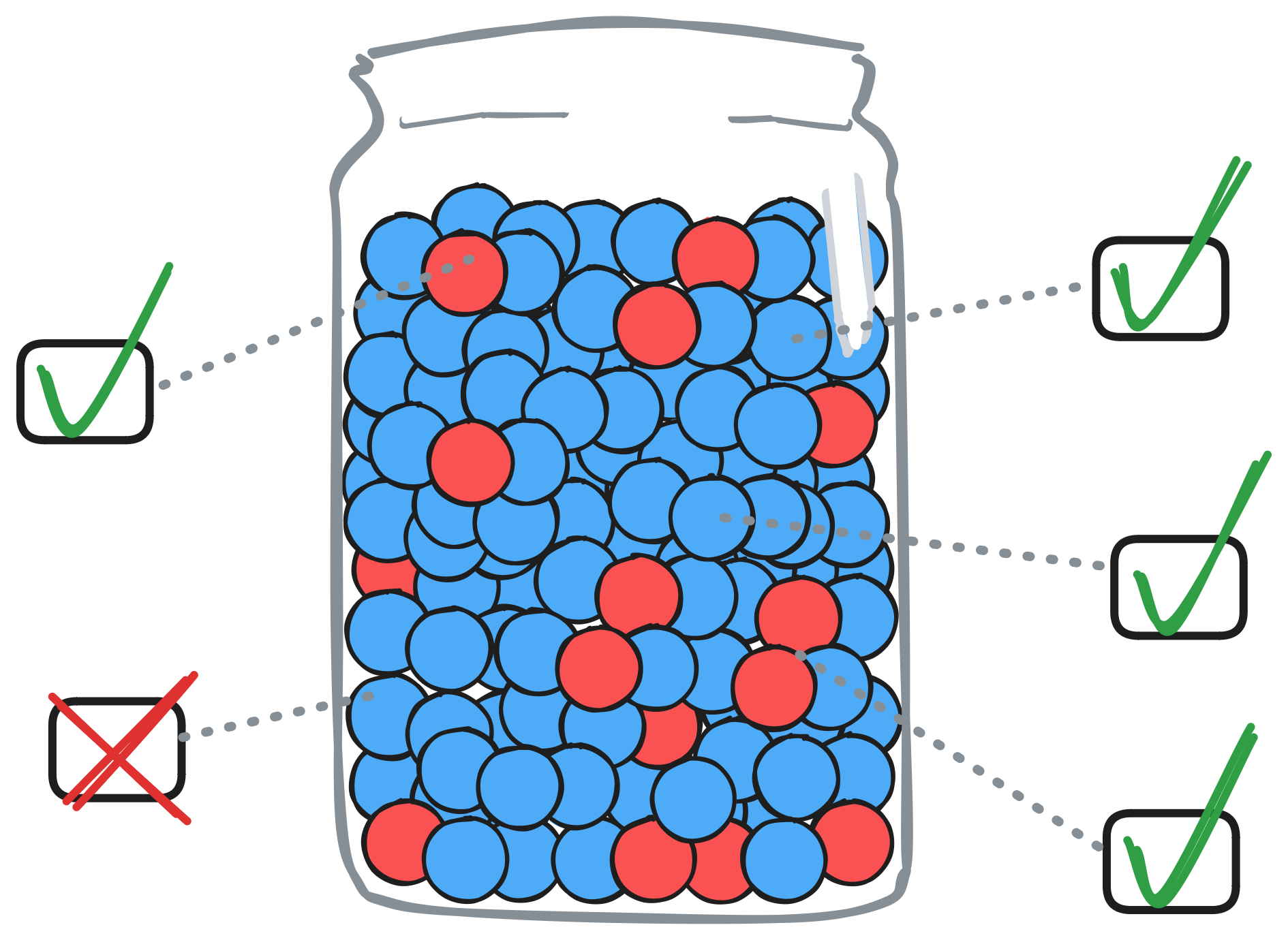
It’s probably best to summarize this way: if a product goes through a Quality Assurance (QA) process today, then it is most likely done with AQL.
Except cyber. Until now.
#Using AQL in Cyber
To apply this to a cybersecurity domain, we just need processes that generate collections of products or artifacts. At Wirespeed, we use this to measure the quality of our Automated MDR case verdicts! Here are some other examples AQL could be applied to the cybersecurity domain:
- Collections of penetration test findings
- Third Party Risk Assessment Reports
- User onboarding and termination process adherence
- The sky is the limit!
AQL Step by Step
If you scrolled ahead, saw the complicated looking tables, and thought this isn’t for you, keep reading. I promise this will be useful and simpler than it looks. We even have a hack at the end to make it super easy!
#1. Step One: Determine the confidence level for our quality inspection.
There are 3 “confidence levels” in AQL, but all you really need to know is choose Level II since it’s pretty much universal across all industries.
Optional: If you want to know more:
- Choosing Level 1 means sampling less, so your confidence is lower.
- Choosing Level 3 means sampling more, so your conidence is higher.
- Reserve going up or down after you’ve gotten a strong baseline on your quality.
- Or just always stick with Level 2: it’s good enough for surgical grade equipment, so it’s good enough for cybersecurity!
#2. Step Two: Determine the lot size.
This will be a collection of cybersecurity items for a given period of time (e.g. a day or week), like a batch of alert verdicts or any of the other examples above.
#3. Step Three: Determine the Code Letter on the “Sample Size Code Letters” table
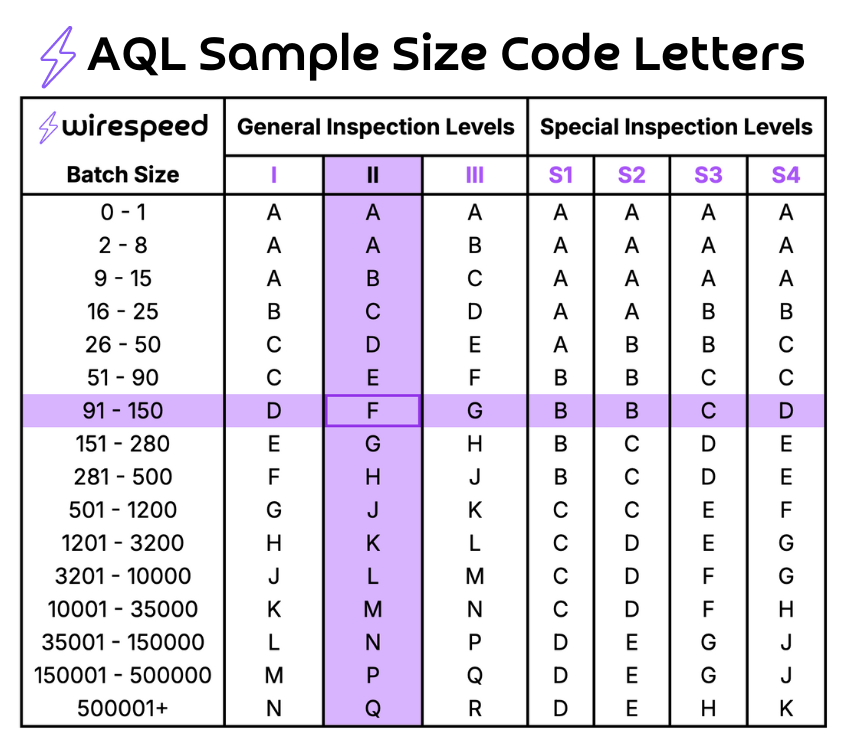
Remember from Step 1, we’re just picking the default of “General Inspection Level II,” so all we have to do is find the intersection where our batch size in the first column meets Inspection Level II on the table above.
Example: Let’s say we have 100 items in our batch. Find the row with sample size from 91 to 150, slide over to the column for General Inspection Level II, and we arrive at Code Letter “F” for our inspection. Easy!
#4. Step Four: Find the Code Letter on the next table: “Single Sampling Plans for Normal Inspection”
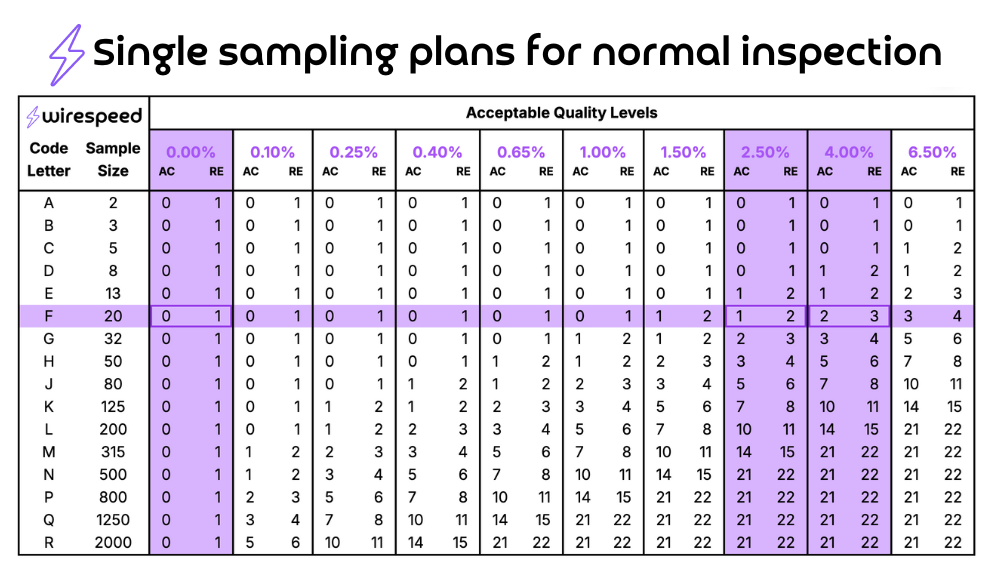
Now switch to the second table below, but all we’re doing is taking the “F” from the previous step and finding the corresponding row on this second table.
#5. Step Five: Select the AQL Levels you’ll use
This seems complicated, because on a standard AQL Table 2, like below, there are several columns from 0.065 to 6.5; however, the overwhelming cross-industry standard is to follow these quality levels:
- CRITICAL (defects that are a safety hazard for the customer) at 0
- MAJOR (defects that make the product “unsaleable”) at 2.5
- MINOR (defects that are a slight deviation from specification) at 4.0
#6. Step Six: Determine Sample Size for Inspection
This is very simple: row “F” on the table below has a Sample Size of 20 (the cell in the column next to F). So we’re going to randomly pull 20 items out of our batch of 100 alerts (from Step 3 above).
#7. Step Seven: Determine the Accept/Reject Numbers
Slide across row “F” to each column for Critical, Major, and Minor (0, 2.5, and 4.0, respectively):
- CRITICAL. There is no AQL 0 column, which seems confusing, but an AQL of 0 means we accept a batch with 0 Critical defects and reject any batch with 1 or more.
- MAJOR. Slide to where “F” meets 2.5. Accept
1or less defects and Reject the batch for2or more. - MINOR. Slide to column 4. Accept
2or less and Reject at3or more.
NOTE: Many traditional AQL Table 2 representations, like above, have arrows in them. IF YOU HIT AN ARROW in the cell where those meet, just follow the arrow in the direction it goes. For example, if we were hitting Sample Size Code Letter A with a sample size of 2 and an AQL of 2.5 we would see a down arrow that we would follow to 0 and 1 for _Accept and Reject, respectively. Just think of it as the board game Chutes and Ladders from when you were a kid!
For example, if we pull a random sample of 20 out of 100 alerts, we can tolerate 0 Critical defects, 1 Major defect, and 2 Minor defects. If we have 1, 2, or 3 (respectively for each category), then the ENTIRE BATCH FAILS INSPECTION and each item in the batch should be re-inspected manually.
Hacking AQL
This hack simplifies AQL so much, that you might wish you didn’t read the longer explanation above. That’s ok. When you share this with your cybersecurity friends, tell them to skip straight to this part, if it bothers you that much. Just remember: sometimes you have to know where things come from!
Since most industries default to General Inspection II and AQL levels of 0, 2.5, and 4.0 for Critical, Major, or Minor defects, we could just use a single, simple table instead. Also, let’s include the 0 column for Critical since the traditional AQL tables don’t. The best part? We made this Simplified AQL version online and interactive!
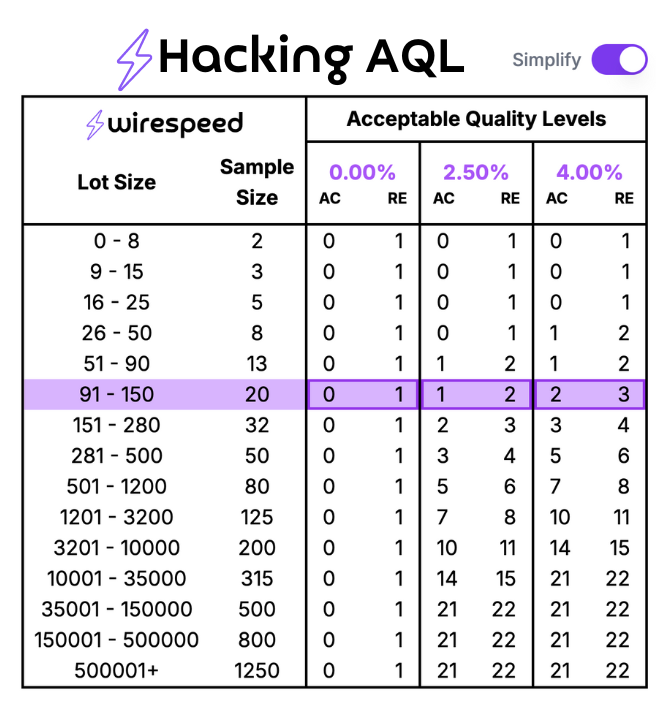
If we have a batch of 100 items, we can quickly find the row with 91 - 150, see that we need to randomly sample 20 of them, and that we can tolerate 0 Critical Defects (next column), 1 Major Defect (next-next column), and 2 Minor Defects (the final column). See how simple this can be?
Help me Start Using AQL for Cyber
You’re convinced: this is amazing and cyber has been missing it. Now let’s jump start this into your program!
#Step 1. Group your items
We’ve been using this to assure quality on our Wirespeed MDR case verdicts. Other cyber examples are listed above. Get your collection and figure out a time series to splice it up. Start with daily or weekly, depending on the volume.
#Step 2. Use our Online Interactive AQL Guide
That’s right. We couldn’t just tell you how valuable AQL is. We also built an Interactive Online AQL Sampling Calculator that you can use right now to pick your sample sizes and accept/reject limits on easy mode. Don’t forget to click the “Simplify” radio button if you’d like to see our AQL Hack mode, all compressed into a single table view like above.
#Step 3. Define Critical, Major, and Minor
This varies for your domain and you’ll need to define it. As a reference, here is how we define it for Wirespeed MDR:
-
CRITICAL: a false negative, i.e. we did NOT mark an actionable detection as actionable, and our customer now has a safety hazard because they may not know about an intrusion happening in their environment. We err on the side of 0 false negatives and some false positives (but we’d like that close to 0 also), because a false positive (an escalated alert that really isn’t actionable), doesn’t cause a safety issue, it causes a product saleability issue. Whatever you pick for Critical, just remember that if it happens, you’re manually reviewing the entire batch, so be thoughtful about how you define it!
-
MAJOR: In MDR, too many False Positives drive customers to find other solutions, which means the MDR isn’t “saleable,” so those are definitely Major defects. When a detection gets the wrong category, description, and response resolutions steps, that’s also a big problem causing the customer to wish they had something else. These represent Major defects for us. Because we are imperfect humans, like everyone, we acknowledge this may happen, and we tolerate a small percentage before we are reviewing all work again by hand.
-
MINOR: These are primarily cosmetic defects. In MDR, this means the alert was escalated (or not) as it should have been, it had the proper categorization, description, and next steps response resolution, but there were minor details that were wrong, such as possibly parsing a supporting detail incorrectly without affecting the verdict. We track and fix those, too, of course, but with a higher level of tolerance.
#Step 4. Perform Your First AQL Assessment
With your batches of items grouped, sample sizes and accept/reject levels defined from our Online Interactive AQL Calculator, and Critical/Major/Minor defined, it’s time for your first assessment!
Randomly pull the number of sample items from your batch, careful to avoid sampling bias (don’t just take the fun/easy ones or the ones you know are likely to have problems). Ask if there are Critical, Major, or Minor defects on each sample item. If you reach the reject lot - which will happen - it’s time to pull the entire batch to assess. (This is a good reason to start with small batches.)
#Step 5. From One Assessment to a Repeatable Process
After your first assessment is complete, make your process improvements to learn from the defects that were found. Now, it’s time to repeat until it’s a disciplined process. Track your results and share them transparently with your team and customers. Be proud of your objectively measured quality!
Do you have a success story applying AQL to your Cybersecurity program? Follow Wirespeed on LinkedIn / X and send us a message!
Does your MDR provider share their quality metrics with you? If not, would you like to see how we share them with our customers? You can launch your own free side-by-side, head-to-head evaluation right now (takes 2 minutes to start).